
Website Maintenance Checklist: What to Check Weekly, Monthly and Yearly

A website isn’t something you finish. It runs on software that changes constantly, it holds business details that go out of date, and it competes in search results that never stop moving. The good news is that keeping a small business website healthy mostly comes down to a short list of tasks done on a regular schedule.
Every week, check that your site loads, your forms send and your backups ran. Every month, apply and test updates, review security alerts and refresh any outdated content. Every quarter, test speed and mobile layout and fix broken links. Every year, renew your domain, review every page and check the site against your current business goals.
Weekly checks
These take a few minutes and catch the problems that cost you leads quietly.
- Visit your own website on your phone and on a computer. Does the home page load quickly and look right?
- Submit your contact form. A form that stops sending email is one of the most common and most expensive website problems, because nobody tells you.
- Confirm your backups ran. A backup you’ve never checked is a backup you can’t count on. Keep copies somewhere other than the server the site lives on.
- Watch for security warnings from your hosting company, your security plugin or Google.
Monthly tasks
- Update WordPress, your theme and your plugins. Many updates patch security holes. Back up first, update, then click through the main pages and forms to make sure nothing broke.
- Remove what you don’t use. Deactivated plugins and old themes still sit on the server. If you’re not using them, delete them.
- Review your content. Hours, prices, services, staff, holiday schedules and promotions should match reality.
- Check Google Search Console. It tells you about pages Google can’t index, mobile problems and security issues, for free.
- Glance at your analytics. A sudden drop in visitors or form submissions is often the first sign that something is wrong.
Most website emergencies start as a small problem nobody checked on.
Quarterly tasks
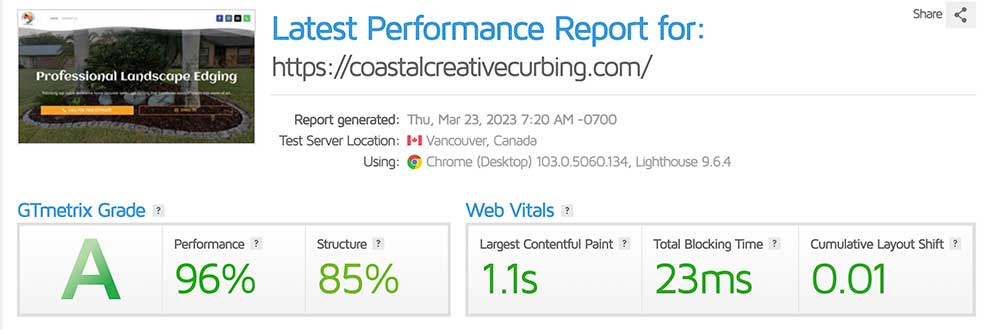
- Test your page speed with a tool like Google PageSpeed Insights or GTmetrix, especially on mobile. Large images and bloated plugins are the usual culprits.
- Check for broken links, both links to your own pages and links to other websites.
- Review your user accounts. Remove logins for former employees and old contractors, and make sure every admin uses a strong, unique password.
- Check your PHP version with your host. Older versions stop receiving security updates and can slow your site down.
- Update your best content. Add recent projects, new reviews and fresh photos to the pages that bring in the most visitors.
Yearly tasks
| Task | Why it matters |
|---|---|
| Renew your domain name | An expired domain takes your website and often your email offline. Turn on auto-renew and keep your contact details current with the registrar. |
| Confirm your SSL certificate renews | Browsers warn visitors away from sites without a valid certificate. |
| Review every page | Read your site as a customer would. Remove outdated services, fix old claims and tighten anything unclear. |
| Check legal pages | Your privacy policy and terms should match the tools and forms you actually use today. |
| Test a full restore | Restoring a backup to a test copy proves your backups really work. |
| Revisit your goals | If the site no longer matches your business or brings in leads, it may be time to plan a refresh or redesign. |
Not sure whether your site needs a tune-up or a fresh start? Our post on signs your website needs a redesign can help you decide.
Do it yourself or hand it off?
Everything on this list is doable for a hands-on owner with a simple site. The challenge is consistency. Busy months happen, updates get skipped, and a few skipped months can turn into a hacked site or a broken form nobody noticed.
If you’d rather not think about it, our webmaster services cover this checklist for you, and our care plans start at one hour per month. Curious about the numbers? See how much website maintenance costs.
- Weekly: check the site, test your forms and confirm backups.
- Monthly: run and test updates, clean up plugins and review content.
- Quarterly: test speed, fix broken links and review user accounts.
- Yearly: renew your domain, review every page and test a full restore.
Want this checklist handled for you?
We’ll start with a full health check of your website, then keep it updated, backed up and working every month so you can focus on your business.